Organize
Claude takes the clinician's screen entries and arranges them into one structured movement profile, rather than a scattered set of notes.
Prototype · in development · 2026
An early-stage prototype being developed to organize the joint range, breathing, balance, and movement findings from an in-person screen into one plain-language visual map a patient can follow.
The Problem
Movement findings often live in the clinician's notes or in a spoken explanation during the visit. What a patient carries home is a set of impressions: which areas feel involved, what order to work on them, and why that order matters. Movement Map is a prototype built to test a simpler idea — show the findings as one plain-language picture while the reasoning is still fresh.
Planned Workflow
The first three describe the planned path from screen to patient map. The fourth is a rule that stays in place for every output.
The clinician runs an in-person movement screen and records what is found: joint range, breathing pattern, single-leg balance, squat and hinge quality, and the positions that provoke pain.
Claude arranges those entries into a structured movement profile — one ordered record of the findings instead of scattered notes.
The planned output is a patient-facing visual map: the limited regions, how they connect up and down the chain, the reasoning behind the order of the plan, and a home program.
Every output is reviewed and edited by the clinician before a patient sees it. Nothing reaches the patient un-reviewed.
Illustrative Example
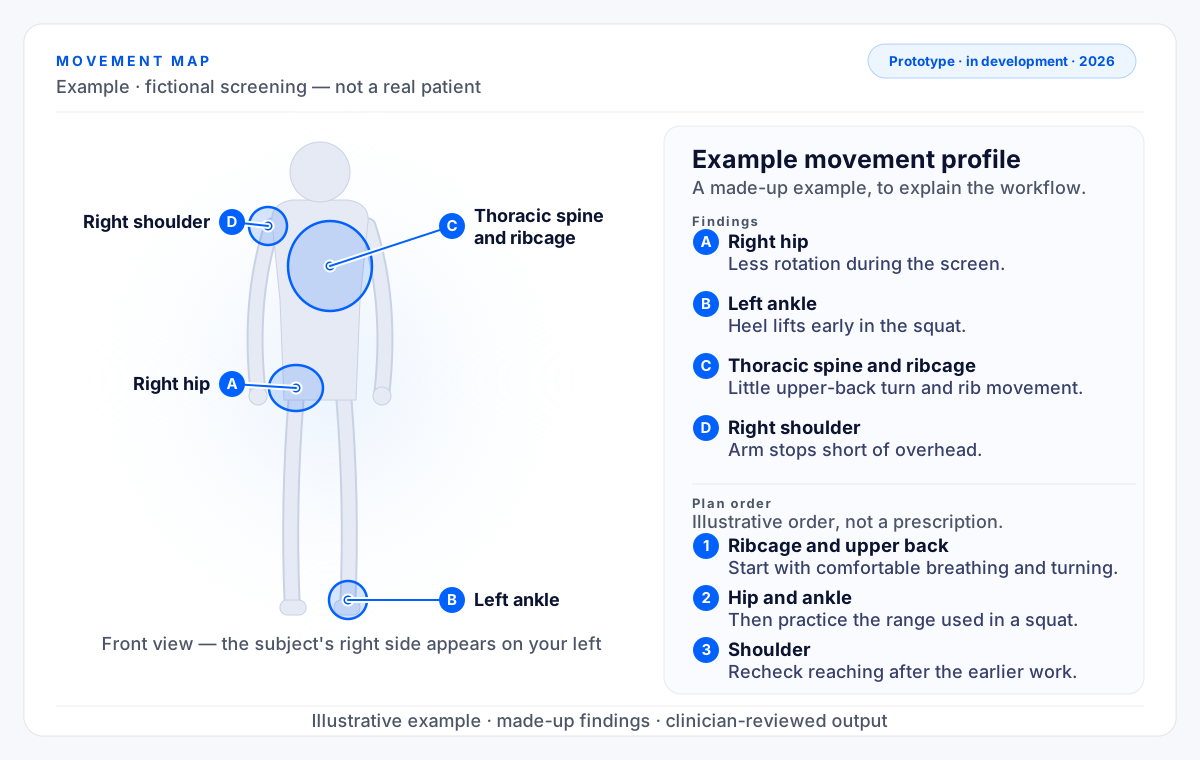
The figure below is a made-up example, drawn to show the shape of the idea. None of the findings are real.
Scroll sideways to see the whole figure.
Every line below is an illustrative example with made-up findings — not patient data.
The order is illustrative only. It does not imply a medical cause, a diagnosis, or a treatment dose.
Built with Claude
Claude, Anthropic's AI model, handles the sorting and the drafting. The clinician keeps the judgment.
Claude takes the clinician's screen entries and arranges them into one structured movement profile, rather than a scattered set of notes.
It drafts the map in everyday words: where movement is limited, how the areas relate, and why the plan is ordered the way it is, instead of exam shorthand.
Every draft comes back to the clinician to read, edit, and approve. The clinician's judgment is the final word on anything a patient sees.
Status
Movement Map is an early-stage prototype developed by Dr. Sean Reid, D.C., L.M.T. inside his independent sports chiropractic practice, Reid Chiropractic and Wellness (founded 2026), in Temecula, California. It is being tested inside that practice and is not a released product.
Principles
Nothing reaches a patient without the clinician reviewing and editing it first.
Findings are shown in everyday words a patient can follow, not in clinical shorthand.
The tool organizes what the clinician entered. It does not diagnose, and it does not replace a hands-on exam.
The input is the clinician's own entries: no camera and no motion capture. This page shows a fictional example, and no real patient data appears on it.